A functioning cochlear implant can still leave you missing speech in noise, at a distance, during group discussion, or after prolonged listening. By separating equipment faults from programming, medical, and environment-related problems, you can choose practical accommodations, respond when the processor stops, and know when specialist assessment is needed.
Key takeaways
- Request captions, written instructions and a front-facing speaker.
- Use remote microphones for distance, noise and group discussions.
- Check batteries, cables, microphones and program settings before seeking help.
- Contact an implant-trained hearing specialist when problems persist or suddenly worsen.
How cochlear implant problems appear in the classroom
A child may understand a quiet one-to-one conversation yet struggle in a real classroom. Cochlear implant problems at school often become visible when speech arrives quickly, from a distance, or alongside other sounds.
- The teacher speaks while walking around, turns away, or writes on the board.
- Several classmates talk in a group discussion, so the child cannot identify who is speaking or follow rapid replies.
- A classmate speaks softly, from behind, or across the room.
- Chairs scrape, fans run, or nearby students whisper, making speech harder to separate from classroom noise.
- Announcements come through a distant loudspeaker, hallway speaker, or intercom and are missed entirely.
- The child follows the lesson but misses brief peer comments, changed instructions, or information given while materials are being handed out.
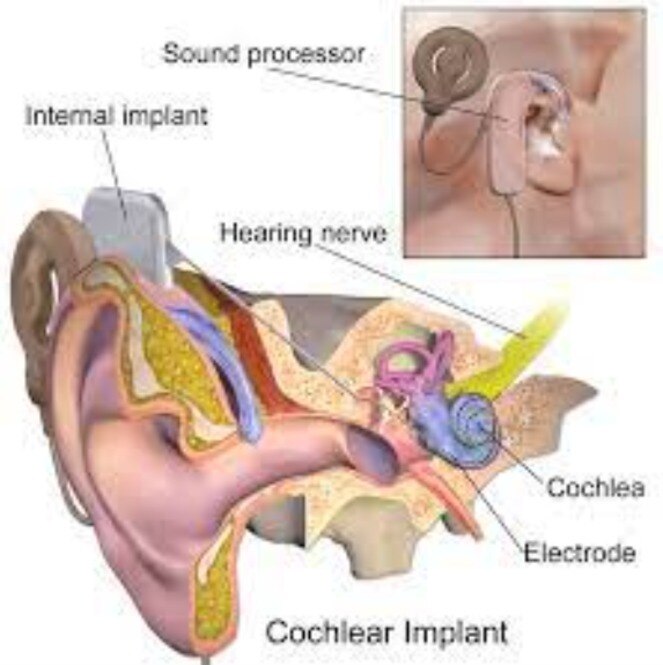
These patterns do not automatically mean the implant has failed. A cochlear implant bypasses damaged inner-ear hair cells and stimulates the auditory nerve; it does not restore normal hearing, and the brain must learn to interpret its signal. Noise, reverberation, distance, group speech, and speaker location increase that effort.
After sustained listening, a student may become visibly tired, stop responding, guess answers, or need repeated instructions. A quiet-room word score alone will not reveal these classroom difficulties; observe listening during actual lessons and ask what the student missed.
How to make lessons, discussions, and announcements easier to follow
Move the teacher’s voice closer before turning the processor louder. A remote microphone or classroom FM/DM system sends speech directly to the processor, reducing the effects of distance, reverberation, and competing voices.
| Situation | Classroom change | Why it helps |
|---|---|---|
| Teacher speaking from across the room | Use a remote microphone and preferential seating | Reduces distance and room echo |
| Group discussion | One speaker at a time; identify each speaker before talking | Prevents voices from overlapping |
| Soft-speaking classmate | Ask the speaker to face the student and speak clearly | Improves access to quiet speech |
| Noisy activity | Close doors, reduce nearby noise, and move to a quieter area | Limits competing sound and listening fatigue |
| Bell or public announcement | Provide written, captioned, visual, or vibrating alerts | Prevents missed information when speech is unclear |
The teacher should face the student, keep instructions visible, and check understanding with a specific question rather than “Did you hear?” Written steps, captions, and shared notes also protect against missed rapid comments. Do not assume front-row seating fixes poor acoustics.
For cochlear implant hearing problems at school and work in Pune, schedule short communication breaks during long lessons or discussions. Sustained listening in noise consumes concentration; increasing volume alone can make distortion and background noise more intrusive. Ask for advance notes and a written recap when an announcement or instruction matters.
How cochlear implant problems affect meetings, calls, and safety at work
Missed instructions, difficult meetings, and poor speech understanding on telephone or video calls do not automatically mean the implant has failed. Workplace listening problems at work often arise from distance, background noise, overlapping speakers, poor microphone placement, compressed call audio, or a program that suits quiet speech but not an open office.
| Workplace difficulty | Access accommodation | Why it helps |
|---|---|---|
| Group meeting with overlapping speech | Quiet room, one speaker at a time, agenda in advance, written follow-up | Reduces noise and lets you prepare for unfamiliar terms |
| Video call or telephone | Live captions, speech-to-text, remote microphone, reliable headset | Supplies a clearer speech signal than a distant room microphone |
| Open office discussion | Seat the speaker facing you and reduce nearby background noise | Improves visual and auditory access without changing your duties |
| Alarm or emergency announcement | Visual beacon, vibrating alert, text notification, or buddy confirmation | Adds a dependable warning channel |
| Long meeting or call | Scheduled communication breaks and access to notes or transcript | Limits listening fatigue caused by sustained concentration |
Turning the processor louder is not a complete solution; it can make noise and distortion more intrusive. Separate an external processor, cable, battery, moisture, or mapping issue from a medical or internal-device problem before changing work arrangements.
A cochlear implant is not hearing protection. In noisy areas, check the workplace sound level, the processor’s operating limits, and suitable protective and communication measures with the employer and implant team.
What to check when the processor is unreliable or stops working
A spare battery or backup processor is the quickest divider between a power problem and a problem needing clinical assessment. Follow your processor model’s instructions; do not apply generic internet fixes or keep increasing volume.
- Check the power indicator, battery charge, charger contacts, and battery seating. Try a known-good battery.
- Inspect the cable, coil, and connector for looseness, cracks, or bent contacts. Reposition the coil over the implant.
- Check microphone covers or ports for blockage, dirt, or damage. Replace covers only as the manufacturer directs.
- Confirm the selected program, volume, and sensitivity. Switch to the usual program, then test in a quiet room.
- If the processor became wet, stop using it and dry it in the manufacturer-approved drying system. Do not use a hairdryer.
- Test without the suspected classroom, telephone, Bluetooth, or workplace audio source. Noise or incompatibility can mimic device failure.
| Symptom | What it suggests | Next step |
|---|---|---|
| No sound with a charged battery | Processor, cable, coil, or connection fault | Try backup equipment; arrange an implant-clinic equipment check |
| Sound returns after changing position | Coil placement or cable problem | Secure the coil and inspect the cable |
| Only noisy rooms cause difficulty | Listening environment, microphone placement, or unsuitable program | Reduce noise and request audiology programming advice |
| Crackling, intermittent output, or sudden loss with known-good equipment | Equipment, mapping, or internal-device problem | Seek audiology testing, including listening checks and impedance testing |
For cochlear implant troubleshooting in Pune, choose implant-specific audiology and ENT support; a general hearing-aid repair visit cannot assess mapping or the implant site.
When to seek implant-specific help for school or work difficulties
Arrange audiology or ENT assessment when listening remains difficult after you have checked the battery, cable, coil, microphone covers, program, and moisture exposure. Book promptly if performance worsens suddenly, speech sounds distorted, or the processor repeatedly cuts out.
New pain, redness, swelling, drainage, fever, marked dizziness, facial weakness, or sudden loss of hearing or processor function needs urgent contact with the implanting ENT service, not routine troubleshooting.
A hearing implant doctor in Pune should separate an external-processor fault from a mapping problem, medical condition, or internal-device complication. Ask for a coordinated review: the ENT surgeon examines the ear and implant site, the audiologist tests equipment and programming, and a speech-language or auditory-verbal therapist assesses real-world communication.
Ask the clinic to provide:
- Implant candidacy assessment, medical review, and imaging when a new implant or revision is being considered
- Processor testing, replacement-part guidance, and programming or mapping support
- Listening rehabilitation aimed at classrooms, meetings, telephone calls, and noisy workplaces
- MRI guidance based on your exact implant model and magnet arrangement
- A named continuing-support contact after surgery, plus a documented emergency pathway
- Advice on workplace noise, alarms, hearing protection, and processor limits for water, dust, impact, and temperature
For cochlear implant troubleshooting in Pune, use an implant service rather than a general hearing-aid repair visit. Dr. Ajay Kothadiya’s ENT Clinic - ENT Specialist, ENT Surgeon & Endoscopic Surgeon in Pune can be considered when you need ENT assessment linked to implant-specific hearing concerns.
Related service
Cochlear Implant Hearing Problems Cochlear Implant Hearing Problems ₹600 Cochlear implants can improve hearing in people with severe hearing loss who are no longer helped by using hearing aids. View service → |
Frequently asked questions
How do cochlear implant problems appear in the classroom?
You may miss speech from a distance, rapid discussion, group work, videos without captions or announcements over background noise.
How can lessons, discussions and announcements become easier to follow?
Ask speakers to face you, reduce background noise, provide captions or written notes, use a remote microphone and repeat important announcements.
How do cochlear implant problems affect meetings, calls and safety at work?
You may miss overlapping comments, telephone speech, alarms or instructions. Request captions, written follow-up, visual alerts and a quieter meeting position.
What should you check when the processor is unreliable or stops working?
Check the battery or charging, cable, coil position, microphone covers, volume and program settings, then test spare equipment if available.
When should you seek implant-specific help for school or work difficulties?
Contact your implant team or a hearing implant doctor when troubleshooting fails, performance suddenly changes, sound becomes distorted or equipment repeatedly stops working.